Field service management

Field service software shaped around how your crews actually work.

For HVAC, plumbing, electrical, maintenance and other home- and site-service businesses. Start from a working office-and-technician application and shape it around your trades, your process and the tools you already use.

Built for

  • HVAC
  • Plumbing
  • Electrical
  • Facility maintenance
  • Appliance repair
  • Cleaning & property services

Demo application

Brightline Field Service — Office & dispatch app + technician phone app

Two connected apps for a home-services business: an office app for customers, work orders, scheduling and dispatch, and a phone app that takes technicians from “start travel” to a signed-off job.
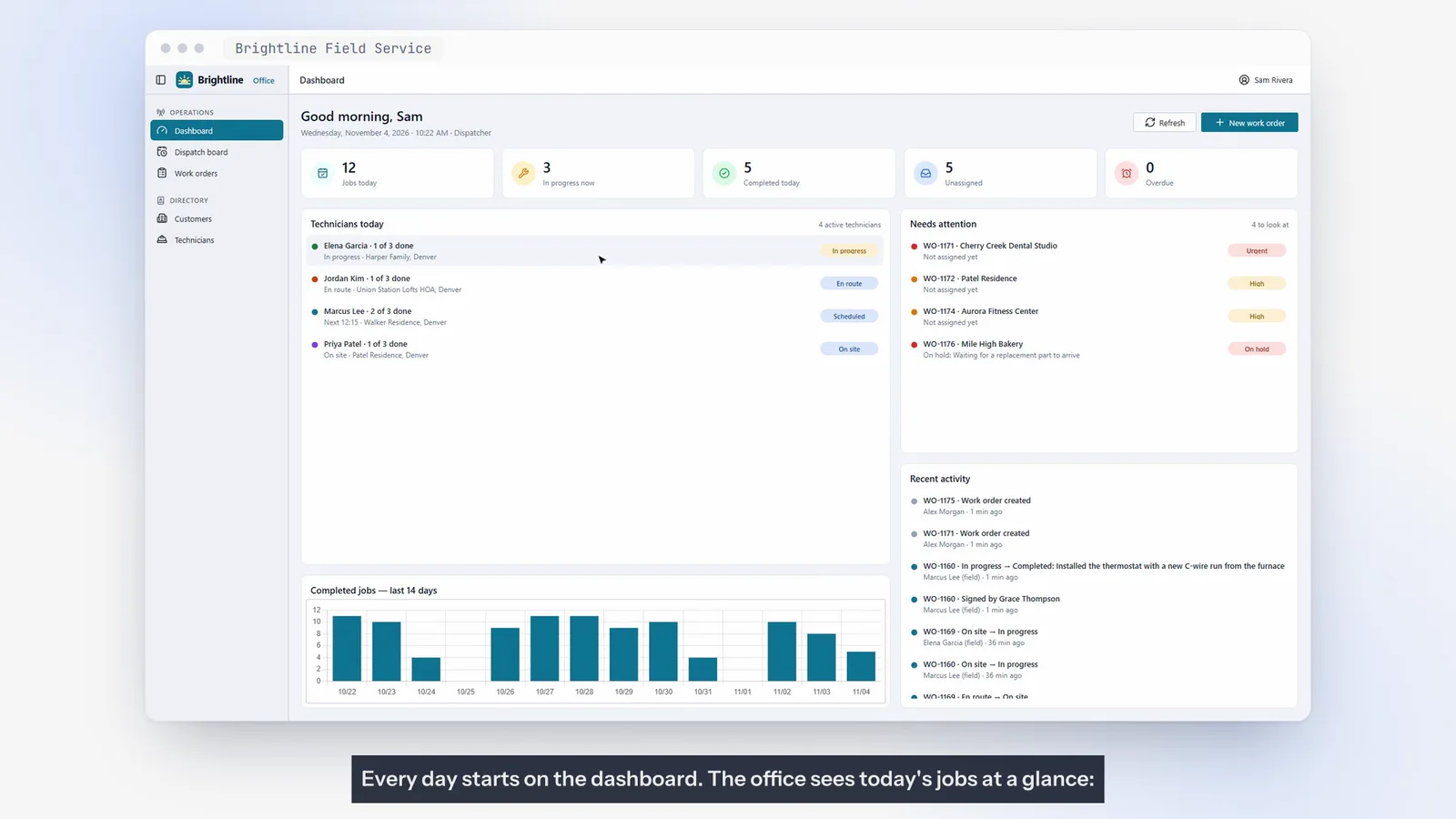
A dashboard for the office

Today’s jobs at a glance — who is on site, who is on the way, and what needs attention: urgent requests, overdue visits and jobs on hold.

Scheduling that checks as you type

Booking a technician who is already busy is flagged before anything is saved, so double-bookings are caught at the source.

Live dispatch board and map

The whole team on one timeline — finished work, technicians on the road, jobs in progress and the queue still waiting — plus a map of where everyone is headed.

A phone app built for the field

One big button moves the job forward: start travel, arrived, start work. Checklists, notes and photos that are resized on the phone so they upload on a weak signal.

Signed on the glass

A short summary and the customer’s signature close the job. The office sees the summary, photo and a timeline of who did what, and when.

Secure by design

The office app owns the data. The phone app talks to it only through a secure API, roles decide who can do what, and technicians only see their own jobs.

  • Customers & locations
  • Work orders
  • Scheduling
  • Dispatch board
  • Map view
  • Technician app
  • Photos & signatures
  • Reports & CSV export
Screens, chapters & transcript
Typical workflows

What a field service application can cover.

01

Customer & site management

Customers, service locations, access notes, equipment and complete service history in one place.

02

Work orders

Capture what the customer reported, the trade, priority and a checklist for the technician.

03

Scheduling & dispatch

Book technicians with conflict checks, see the whole team on a dispatch board and map.

04

Technician mobile app

Today’s jobs, status updates, checklists, notes, photos and on-screen signatures.

05

Estimates & invoicing

Quote the work, convert to jobs and invoice — or integrate with your accounting software.

06

Operational reporting

Completed jobs, time on site, on-time arrivals and exports for your accountant.

Make it yours

Customize the demo — or start fresh.

Use the demonstration as a proven starting point and we adapt it to your workflows, terminology, data and brand. If your needs are different, we design and build a new application instead.

  • Your trades, job types, checklists and priorities
  • Estimates, quotes, invoicing or accounting integration
  • Online booking and customer portal
  • Parts, inventory and equipment tracking
  • Maintenance agreements and recurring visits
  • Automated appointment reminders and follow-ups
  • Your branding — name, colors and logo
  • Integrations with CRM, accounting or telephony
Automation recipes

Automations that pair well with field service software.

All automation recipes
No AI required

Scheduling & Operations

Notify technicians about assigned jobs

New and changed jobs reach the right technician instantly — with everything they need.

  1. 01Job assigned
  2. 02Notify technician
  3. 03Acknowledge
  4. 04Update office
No AI required

Scheduling & Operations

Send appointment confirmations and reminders

Confirmations when booked, reminders before the visit, and easy rescheduling.

  1. 01Appointment booked
  2. 02Send confirmation
  3. 03Reminder before visit
  4. 04Confirm / reschedule
No AI required

Customer Support & AI

Missed-call follow-up

A missed call triggers an immediate text back and a call-back task for your team.

  1. 01Missed call
  2. 02Send text-back
  3. 03Create call-back task
  4. 04Track outcome
AI agent

Customer Support & AI

AI phone receptionist for customer inquiries

Answer calls around the clock, capture requests and book or route them correctly.

  1. 01Incoming call
  2. 02AI receptionist
  3. 03Answer or capture request
  4. 04Book / hand over
  5. 05Log to system
Questions

Frequently asked

Is Brightline Field Service an off-the-shelf product?

No. Brightline is a working demonstration application. We use it as a starting point and tailor it to your business — adding the features you need, removing the ones you don’t, and connecting the tools you already use — or we build a new application from scratch.

Can it integrate with our accounting or CRM system?

Integrations are part of how we work. We review the systems you use, their APIs and data, and design the integration as part of your project.

Do technicians need a special device?

The technician app shown in the demo runs on a phone. Device and platform choices are agreed during the project based on your team’s needs.

Let’s shape software around your field service business.

Tell us about your workflows and the systems you use today. We’ll come back with practical options.